n8n Gateway Credits: Test AI Automation Without Separate Provider Accounts
n8n Cloud teams can now test supported AI models and tools without opening separate provider accounts or managing additional API keys.
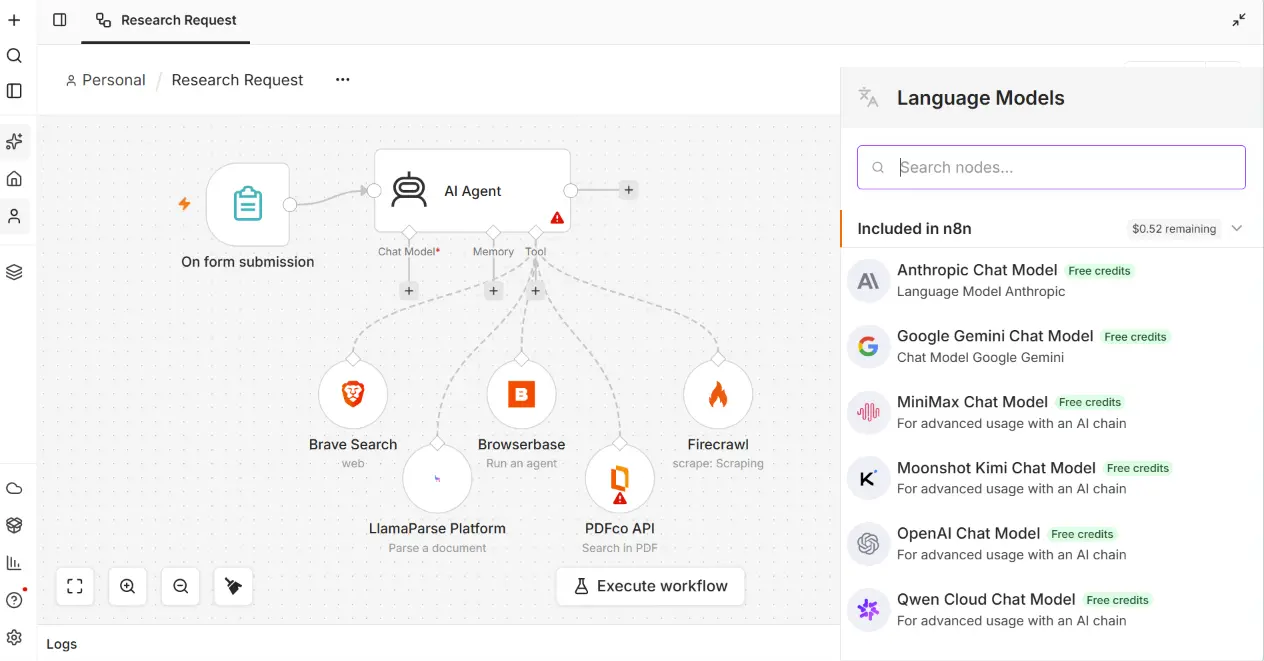
Adding AI to a workflow usually creates work before the workflow can even be tested. Someone has to choose a provider, create an account, add a payment method, generate an API key, and decide who is allowed to manage it.
n8n describes the change as a way to “skip provider account setup.”[2] Gateway Credits offer that shorter route for supported services. A user selects Use Gateway credits on a supported node, and n8n handles provider authentication through its managed gateway. The request cost comes from a prepaid balance attached to the n8n Cloud instance.[1]
For a business testing its first AI automation, that can remove a surprising amount of setup.
What can you use Gateway Credits for?
Gateway Credits support two broad service categories:
- AI models from providers such as OpenAI, Anthropic, and Google Gemini
- tool services for tasks such as web search, scraping, browser automation, and document parsing
The catalogue can change as n8n adds services or providers update their models. n8n’s service pricing page is the current source for supported services and request rates.[1]
Eligible language models appear under “Included in n8n,” together with the remaining Gateway Credit balance.
Services outside the catalogue still work through the normal n8n credential system. You connect your own provider account and API key as before.
Where are Gateway Credits available?
The feature is available from n8n 2.36.0 on n8n Cloud Starter and Pro. It is not available on n8n Cloud Enterprise or self-hosted installations.[1]
This makes Gateway Credits most relevant to small teams already using n8n Cloud, or teams considering Cloud because they do not want to maintain servers and multiple provider credentials.
Self-hosted teams still need to manage their provider accounts directly.
Why this helps during early testing
An early automation project should answer a business question quickly. Can the workflow classify incoming enquiries accurately? Can it extract useful fields from documents? Can it research a company and prepare a record for review?
Separate provider onboarding slows down that test. It can also leave a business with several accounts and API keys before anyone knows whether the workflow is worth keeping.
Gateway Credits let a team test supported models and tools from one n8n Cloud balance. This is useful for a proof of concept, an internal workshop, or a small workflow where simplicity matters more than direct provider billing.
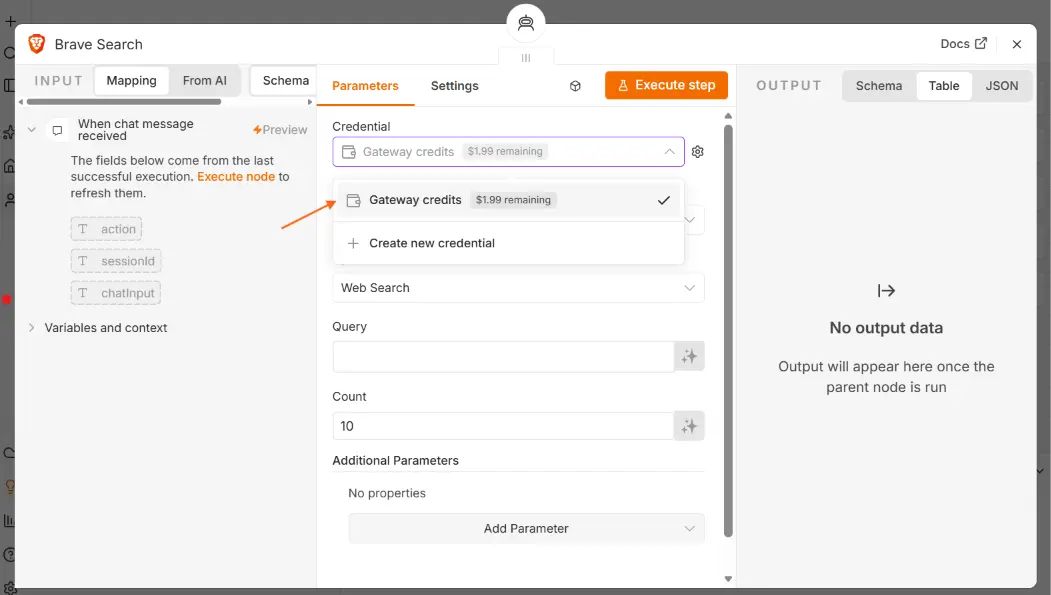
On a supported node such as Brave Search, the team can select Gateway Credits directly from the credential field.
The balance needs an owner
Each n8n Cloud instance has one Gateway Credit balance shared by everyone using the feature. New Cloud users receive a small amount of free credit, including during a free trial.[1]
When that balance reaches zero, nodes using Gateway Credits stop working until more credit is added. Workflows using separate provider credentials are not affected. Paid plans can use manual or automatic top-ups, while trial users must upgrade before adding more credit.[1]
For production use, assign someone to monitor the balance and spending history. A shared balance is convenient, but it can also make ownership unclear when several workflows and team members draw from it.
Top-up credits expire 12 months after purchase. They cannot be transferred to another account, and unused top-ups are generally non-refundable.[1] Buy enough for expected usage, not an optimistic future backlog.
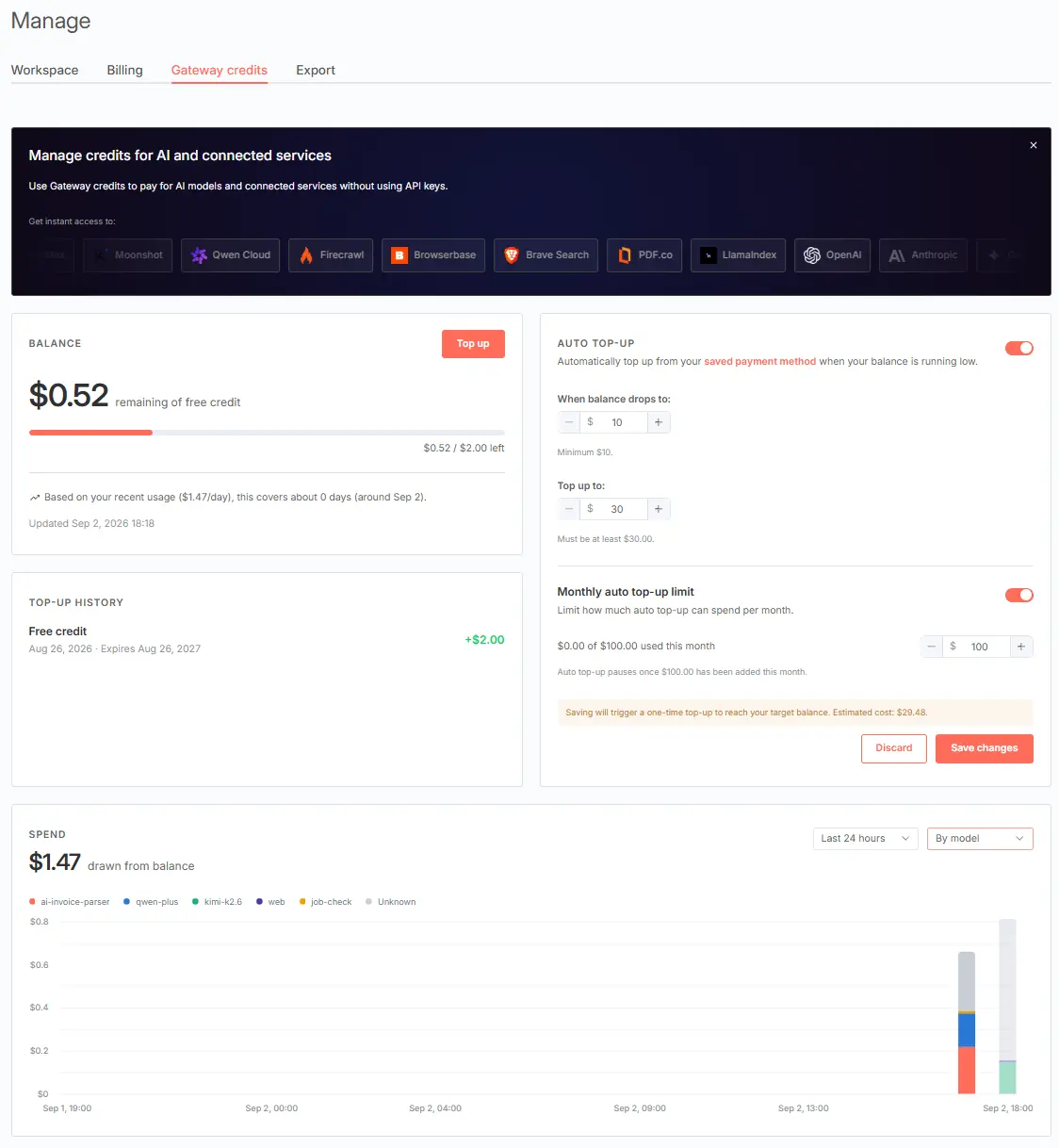
The Gateway Credits dashboard shows the shared balance, top-up history, automatic top-up settings, and recent spend. The amounts in this screenshot are examples from the source account, not current pricing guidance.
Gateway Credits and AI Assistant credits are different
Gateway Credits pay for supported services called by nodes inside a workflow. AI Assistant credits pay for the AI Assistant and AI Workflow Builder in the editor.[1]
The balances do not top up each other. If a team uses both features, track them separately when reviewing cost or investigating why one has stopped.
What happens to workflow data?
A Gateway Credit request passes through n8n’s managed gateway to the selected provider. The provider receives the content required to complete the request, such as a prompt or document text, but does not receive the user’s identity or n8n account details.[1]
Businesses should still review what they send. Customer records, contracts, financial information, and other sensitive content may require a stricter data policy or a direct provider agreement. Easier authentication does not change the sensitivity of the underlying data.
Gateway Credits or your own provider account?
Gateway Credits are a good starting point when:
- you want to validate an idea quickly on n8n Cloud
- the required model or tool is in the supported catalogue
- usage is small enough to monitor through one shared balance
- you do not need provider-specific administration or billing
Your own provider account may be the better fit when:
- you use self-hosted n8n
- a required service is not supported
- your company needs direct provider contracts or invoices
- you need detailed provider-side controls and usage logs
- different projects need separate budgets or credentials
The decision does not have to be permanent. A team can begin with Gateway Credits, prove the workflow, then move to its own credential when operational or procurement requirements become clearer.
A practical launch checklist
Before relying on Gateway Credits in a live workflow, confirm:
- The model or service appears in the current Gateway catalogue.
- The n8n plan supports the feature.
- The team has reviewed the current request rate.
- Someone owns balance monitoring and top-ups.
- The workflow does not send data that violates company policy.
- The failure path alerts an operator if the credit balance is exhausted.
Gateway Credits make the first test easier. The workflow still needs normal production controls around cost, data handling, failures, and ownership.
If your team wants to test an AI workflow but is unsure which model, credential route, or deployment option to choose, book a consultation. Khaisa Studio can help scope the smallest useful proof of concept before you commit to a larger setup.